TikTok DM Restrictions: Latest Policy Updates, Browser Limits, and Outage Checks
Millions of active users open TikTok daily only to watch their direct messages stall beside a stubborn red exclamation mark. When a private chat drops out of nowhere, the immediate reflex is to blame spotty home Wi-Fi or assume an abrupt block. Most of the time, neither is true. TikTok quietly operates one of the strictest communication pipelines in consumer social media, governed by automated safety filters, strict identity parameters, and intentional platform design choices.
The friction grows even sharper when accessing the platform outside native mobile operating systems. An analysis highlighted in an MSN Report detailing browser-based navigation demonstrated how web clients offer direct video consumption without an installed app, yet systematically strip core interaction layers like reliable direct messaging. Understanding why a chat fails requires separating temporary server disruptions from built-in policy enforcement.
📌 Key Takeaways:
- The System Barrier: TikTok completely restricts direct messaging for accounts registered under age 16, while users aged 16, 17 face default closed-loop communication boundaries.
- The Desktop Gap: Operating through a desktop browser strips out essential direct messaging protocols to minimize automated spam farms and credential harvesting.
- The Action Plan: Resolving the standard message failed to send error demands checking mutual follow configurations, clearing the internal cache, and validating phone verification status.
The Architecture Behind Failed Chats: Outages vs. Platform Enforcement
Direct communication breaks down across three distinct layers: platform-wide outages, localized device corruptions, and algorithmic moderation flags. When the app returns a persistent message failed to send error, users should verify whether the infrastructure itself is buckling. Cloud flareups and data center handshakes routinely cause temporary desynchronization between chat threads and remote message queues.
Real-time telemetry trackers such as Downdetector capture regional spikes in unsent packets. During these events, feeds refresh smoothly while the inbox interface freezes entirely. If millions report similar dropouts across North America, Europe, or East Asia, internal routing nodes are likely struggling under deployment rollouts. No amount of restarting will push an unsent message through an inactive pipeline.
When server outage status trackers read normal, local app integrity becomes the primary culprit. Operating TikTok continuously without clearing temporary assets clogs SQLite database indexes. Over months, cached media files corrupt the bridge between incoming push notifications and the outbound socket layer. Purging stored files directly re-aligns that broken synchronization.
Browser Limitations and the Desktop Messaging Wall
Users turning to Safari, Chrome, or Edge to manage accounts encounter strict feature walls. ByteDance deliberately bifurcated the web and mobile experiences. While video browsing, profile editing, and audio search function smoothly on desktops, direct messaging remains heavily throttled or missing altogether.
These TikTok browser limitations serve a practical security purpose. Spam operations routinely run headless browser environments to dispatch thousands of illicit affiliate links, recruitment hooks, and malicious downloads. By enforcing a closed app environment for private correspondence, the platform deters massive script-driven outreach.
Users on desktop clients often discover that their message threads render as read-only streams. Others face an interface where typing a response simply produces a blank state or a recurring transmission failure. If your daily workflow relies on rapid desktop typing, the web portal will disappoint; real-time conversational stability remains tied to authentic mobile clients.
Algorithmic Safety Gates: Age Gates, Verification, and Friend Filters
Platform security policies cause the vast majority of silent messaging failures. TikTok enforces zero-tolerance direct message age requirements based on early regulatory settlements with international child safety watchdogs. If an account profile was registered with a birthday placing the owner under 16 years of age, the direct messaging module vanishes entirely. It cannot be unlocked via parental override.
Accounts belonging to individuals aged 16 to 17 function under tight default restrictions. Their settings automatically default to zero inbound messaging from strangers, disabling incoming requests unless explicitly configured otherwise. Even among adult accounts, lack of mandatory phone number verification halts outbound transmission.
The mutual follow requirement creates another frequent hurdle. If an account relies on privacy settings friends only, both parties must actively follow each other before a conversation opens. Sending a message to an account that follows you back works instantly; sending the exact same text to an account that has not hit "Follow back" sends your message into an unread, quarantined request folder or rejects it immediately.
Direct Messaging Breakdown: Triggers and Resolution Paths
Understanding which setting or restriction is interrupting your chat pipeline saves unnecessary troubleshooting time. The following operational table breaks down common error codes against real-world fixes:
| Failure Symptom | Root Platform Trigger | Required Remediation |
|---|---|---|
| Red exclamation mark next to outgoing chat | Network timeout or server desync | Toggle Airplane mode; test active server telemetry status |
| "Direct messaging is unavailable" notice | Age under 16 or missing phone binding | Complete official age verification appeal; bind phone number |
| Message stuck on "Sent" without delivery | Recipient uses "Friends Only" privacy rules | Confirm mutual follow status with the targeted recipient |
| Chat UI disappears entirely on desktop | Native web client operational restrictions | Transition activity back to the official iOS or Android app |
| Action blocked warning across all chats | Rate-limiting or safety filter enforcement | Halt messaging for 24, 48 hours; appeal shadow penalties |
Account Sanctions, Shadowbans, and Policy Enforcements
Automated safety sweeps trigger suddenly. If an account repeatedly posts identical links, copy-pastes repetitive greetings across dozens of accounts, or triggers external link detection, moderation systems step in. The algorithm interprets sudden bursts of identical outbound messages as malicious automation.
A community guidelines violation does not always come with a clear pop-up notification. Instead, an account falls into restricted account status. The user continues to draft and view their outgoing messages, but the recipient never receives the payload. This silent quarantine curbs abuse before scam operations realize their communication lines have gone dark.
Words matters just as much as volume. Outbound text containing banned URL shorteners, financial keywords associated with illicit trading, or harassment triggers gets dropped mid-route. The platform prioritizes preemptive user protection over uninterrupted delivery. If your account repeatedly hits these linguistic guardrails, a temporary messaging block lasting 24 hours to 7 days activates automatically.
Diagnostic Checklist: Restoring Chat Functionality
When standard platform policies have been satisfied but communication remains broken, systematic troubleshooting will isolate local software corruption. Follow this diagnostic flow before abandoning a broken thread:
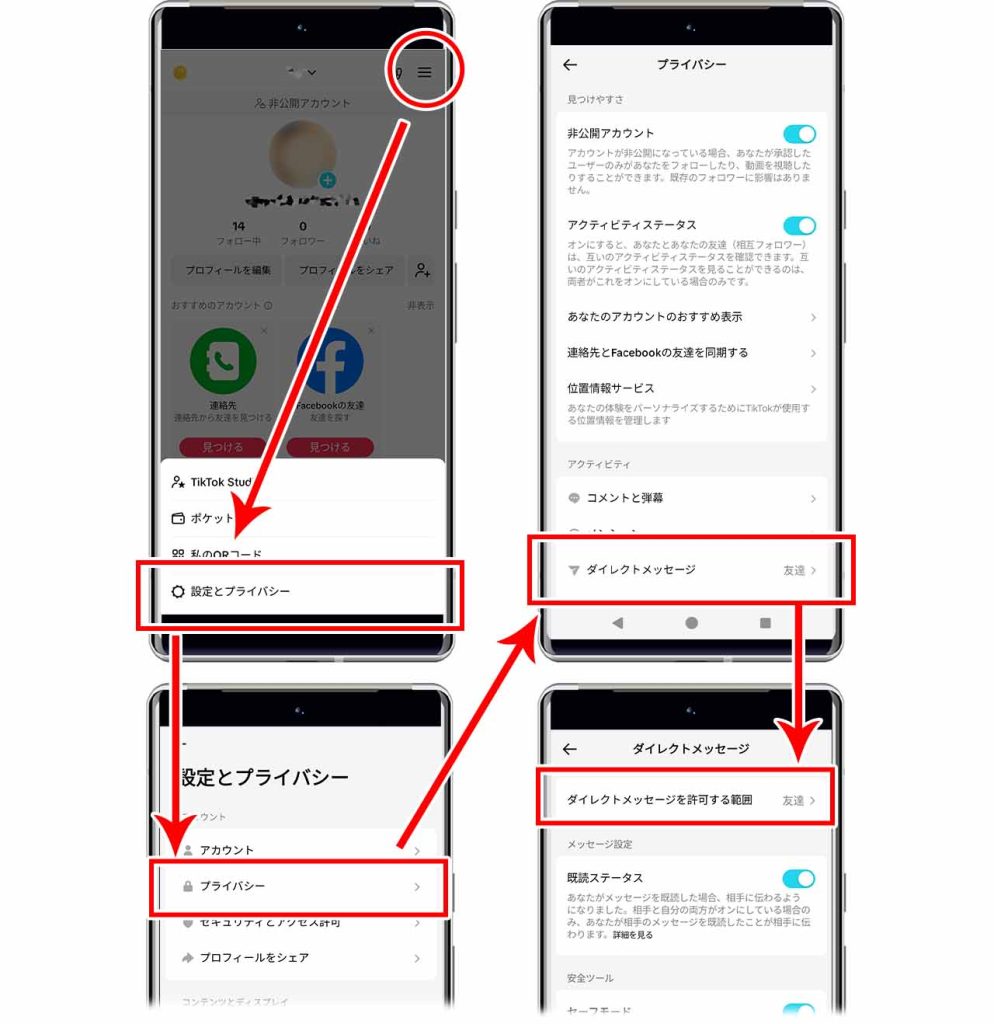
First, clear the internal application cache. Navigate to your Profile, tap the three-line menu in the top right corner, select Settings and privacy, scroll down to Free up space, and select clear app cache. This wipes accumulated playback files, tracking payloads, and temporary chat assets without deleting saved drafts or personal login credentials.
Second, audit your mobile device permissions. Ensure that background app refresh and mobile data permissions remain fully active. Operating behind aggressive VPN routing configurations frequently flags TikTok's fraud detection engine, prompting sudden connection drops. Disconnecting corporate or proxy tunnels frequently restores instant message routing.
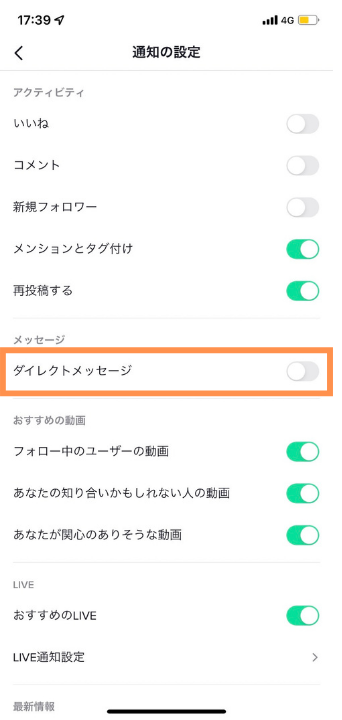
Third, confirm mutual identity parameters. Ask the recipient to verify their incoming direct message permissions under Settings and privacy > Privacy > Direct messages. If their account switched from "Everyone" to "Suggested Friends" or "No one," your outbound messages will remain permanently blocked until they expand access or follow you back.
Frequently Asked Questions (FAQ)
Q1: Why can my friend message me on TikTok, but I cannot reply?
A1: This asymmetry occurs when the friend has open communication settings while your profile lacks mandatory phone number verification or sits under age 16. It also occurs if your account was flagged with a temporary 24-hour outbound rate limit for sending messages too quickly.
Q2: Can I send TikTok direct messages on PC without installing software?
A2: No. While the browser version allows content watching and account management, full-featured direct messaging is largely disabled or heavily throttled on desktop browsers. Reliable chatting requires running the native iOS or Android app.
Q3: How long does a messaging shadowban or rate-limit lock last on TikTok?
A3: Standard automated rate-limiting locks typically expire within 24 to 48 hours, provided no further policy-violating messages are dispatched. Severe or repeated violations flagged by community guideline filters can restrict chat features for up to 30 days.
System Safeguards and Digital Hygiene in 2026
Direct communication across hyper-growth video platforms is no longer an open utility. The days of unrestricted, anonymous inboxes across massive social ecosystems have closed permanently. Operating successfully inside ByteDance's network requires understanding that every chat interface doubles as a tightly regulated security boundary.
A message that refuses to send is rarely a mysterious glitch. It is usually the result of explicit age-gating, desktop interface limits, or mutual-follow privacy filters. Keeping accounts fully verified, maintaining updated mobile software, and respecting communication velocity limits remain the most effective habits for keeping your inbox fully operational.
